How do I power up my smart lock with a USB cable

How do I power up my smart lock with a USB cable

All of our smart door locks are equipped with a USB power port on the exterior panel, allowing you to power the lock in the event of an emergency power failure. Please refer to the User Manual to locate this USB port on your lock.

Plug in a fully charged 5V power bank, a phone charger (not a phone itself), a charged laptop or a laptop charger. Depending on the model your smart lock may have a Micro USB port or a USB-C port.

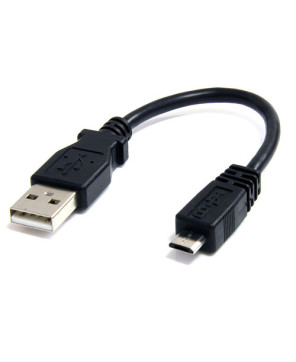
If your lock is equipped with a micro USB port, use a Micro USB to USB-A cable.
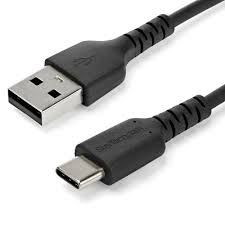
If your lock is equipped with a USB-C port, please use a USB-C to USB-A cable. It is important that the end of the cable connected to a power bank or other power source is USB-A, as some of our locks do not support other connector types.


    • Related Articles

    • Why is my Smart Door Lock not powering up?

      There could be many reasons why your smart door lock is powering up. Following are some troubleshooting steps: First use the emergency USB power port to power up the lock - Follow the instructions on this article to power up your lock using a USB ...
    • Why does my Smart Door Lock say "Unlock", but doesn't retract the latch/deadbolt?

      Q: What should I do if my Smart Lock says "Unlock" but doesn't retract the latch/deadbolt? If your Smart Lock say "Unlock" but fails to retract the latch or deadbolt, there are a few factors you can check to determine the underlying cause. Low ...
    • Does the Wifi Bridge need power?

      Yes, the Wifi Bridge needs power to operate. You can power it using the supplied cable. Simply connect it to a USB power adapter or a USB power socket.
    • Troubleshooting Issue with your SDL-T1

      If you're having any of the following issues with your SDL-T1 Lock, there are a few factors you can check to determine the underlying cause. Issues: Lock doesn’t lock or unlock,/Locks, but doesn't unlock. The bolt doesn’t come out all the way SDL-T1 ...
    • Why does my door always open from the outside?

      Prerequisites: 1. Make sure the smart door lock is powered up using fresh batteries. If it doesn't power up, Why is my Smart Door Lock not powering up? article. 2. Make sure the lock is configured (see this article to configure the lock). There are a ...